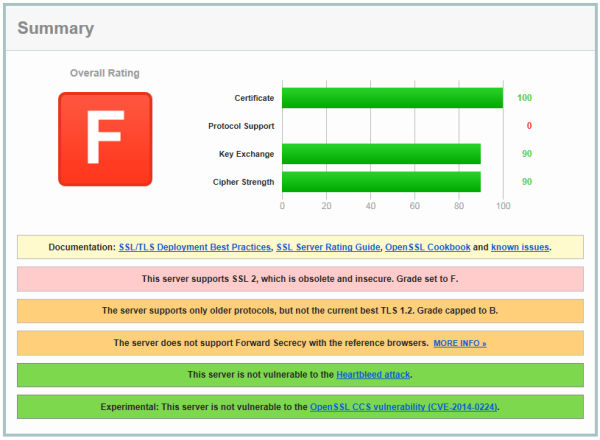
Encryption Hardening on Windows-Based ServersEncryption is a vital mechanism on the Internet and web. It ensures that a client (user) and server can have a private conversation without being listened-in on — whether it be social media, photo sharing, e-commerce and banking or anything in between. It also ensures communications cannot be altered or tampered with. However, encryption is not a single thing but a collection of protocols and algorithms. Some are relatively old, and some new. And some are relatively weak, and modern computing power can crack them, or will be able to crack them in a few years. So encryption, as an ecosystem of technologies, is always being updated to be stronger and more robust, and — importantly — uncrackable. The first widely-used protocol for secure internet communications was SSL 2 (“Secure Sockets Layer”), released in 1995. SSL 3 was released in 1996; TLS 1.0 (“Transport Layer Security”) in 1999, TLS 1.1 in 2006 and TLS 1.2 in 2008. Microsoft also issued a protocol called PCT in the mid-1990s which was barely used. Some of these are now obsolete, but not all editions of Windows have optimal encryption configurations by default. For example:
So most versions of Windows need intervention to enable the superior versions and therefore provide the best encryption experience for clients. The most common uses for encryption in a Windows server context are https/web (Internet Information Services), Remote Desktop/Terminal Services, email (SMTP, Outlook Anywhere) and VPN. Likewise in a Windows workstation context, as a client to those services. Ensuring that your servers are offering only the best encryption is the best way to protect your clients, but there is also an argument to deploy the following changes to workstations so they, too, only negotiate with other servers with the best possible encryption. All of these services use a component called Schannel to perform cryptography, so there is only a single place that requires hardening, but there are several steps: Operating System Updates
Trusted CertificateObtain a certificate from a trusted certificate authority. Windows can issue its own certificates, but because only a small number of certificate-issuing authorities are trusted by web browsers and other clients, the client applications will notify the user that the certificate was issued by a system it doesn't trust. Although this doesn't, as such, affect the encryption, it generally produces enough confusion in users that it places a support burden on IT helpdesks, who have to field queries about certificate errors, and/or desensitizes users to them. Additionally, Windows Server 2008 and earlier or Windows 7 and later without KB2949927 will issue certificates using SHA-1 hashing, which is being deprecated arround 2017 such that many client systems will refuse to communicate with a server that uses it. As of 2014 there were still some certificate authorities that issue certificates with these hashes. Before renewing or obtaining a certificate check that it will use SHA-2 hashes. See also http://blogs.technet.com/b/pki/archive/2010/09/30/sha2-and-windows.aspx. See also Using A Trusted Certificate on Windows Remote Desktop / Terminal Services. Check Server's Current Settings
Remove Older, Insecure ProtocolsSSL 2 and SSL 3 are old, obsolete and contain many weaknesses. In 2014, SSL 3 was found to be much weaker than previously thought; this is the so-called POODLE vulnerability. Disabling these protocols should only affect obsolete (and therefore unsafe anyway) web browsers, such as Internet Explorer 6 on Windows XP/2003. There really is no reason for any web service to support these browsers and no reason to provide older, unsafe encryption protocols for their benefit. In Windows XP and above, to remove support for SSL 3 and earlier, open an elevated command prompt and enter:
reg add "HKLM\System\CurrentControlSet\Control\SecurityProviders\SCHANNEL\Protocols\SSL 2.0\Server" /v Enabled /d 0 /t REG_DWORD /f reg add "HKLM\System\CurrentControlSet\Control\SecurityProviders\SCHANNEL\Protocols\SSL 2.0\Client" /v Enabled /d 0 /t REG_DWORD /f reg add "HKLM\System\CurrentControlSet\Control\SecurityProviders\SCHANNEL\Protocols\SSL 3.0\Server" /v Enabled /d 0 /t REG_DWORD /f reg add "HKLM\System\CurrentControlSet\Control\SecurityProviders\SCHANNEL\Protocols\SSL 3.0\Client" /v Enabled /d 0 /t REG_DWORD /f Enable Stronger ProtocolsTo enable TLS 1.1/1.2 on Windows Server 2008 SP2 (with 4019276) or Windows 7 and above:
reg add "HKLM\SYSTEM\CurrentControlSet\Control\SecurityProviders\SCHANNEL\Protocols\TLS 1.1\Server" /v DisabledByDefault /d 0 /t REG_DWORD /f reg add "HKLM\SYSTEM\CurrentControlSet\Control\SecurityProviders\SCHANNEL\Protocols\TLS 1.2\Client" /v DisabledByDefault /d 0 /t REG_DWORD /f reg add "HKLM\SYSTEM\CurrentControlSet\Control\SecurityProviders\SCHANNEL\Protocols\TLS 1.2\Server" /v DisabledByDefault /d 0 /t REG_DWORD /f reg add "HKLM\SYSTEM\CurrentControlSet\Control\SecurityProviders\SCHANNEL\Protocols\TLS 1.1\Client" /v Enabled /d 1 /t REG_DWORD /f reg add "HKLM\SYSTEM\CurrentControlSet\Control\SecurityProviders\SCHANNEL\Protocols\TLS 1.1\Server" /v Enabled /d 1 /t REG_DWORD /f reg add "HKLM\SYSTEM\CurrentControlSet\Control\SecurityProviders\SCHANNEL\Protocols\TLS 1.2\Client" /v Enabled /d 1 /t REG_DWORD /f reg add "HKLM\SYSTEM\CurrentControlSet\Control\SecurityProviders\SCHANNEL\Protocols\TLS 1.2\Server" /v Enabled /d 1 /t REG_DWORD /f Why not just enable TLS 1.2 and disable everything else? TLS 1.0 is still a necessary configuration option on servers, because some down-level clients support only up to TLS 1.0. As these clients become obsolete, there may be a case to remove TLS 1.0 more widely. TLS 1.0 is obsolete, but older clients communicating with this protocol is not a problem in practice (for the moment). In any case, clients and servers which support TLS 1.2 will communicate with that protocol by default, so the presence of TLS 1.0 is moot in that circumstance. (Previously, Remote Desktop Services only supported up to TLS 1.0 for encryption. Without it, the encryption it offered is a weaker, custom encryption which is undesirable. However with KB3080079 released in 2015, TLS 1.1 and TLS 1.2 are supported, so TLS 1.0 support can be removed from RDS hosts if the clients also support TLS 1.1/1.2.) Adjust Cipher Suite PriorityWindows negotiates a cipher suite to use with clients, and has a default list of suites to offer in order of preference. However the default list contains weak suites and does not prioritise the best suites. Windows XP/2003 For Windows XP/2003, the cipher suites available and the order they are offered cannot be changed, but it is possible to remove completely the older ciphers which are unsafe. Open a command prompt and enter:
reg add "HKLM\System\CurrentControlSet\Control\SecurityProviders\SCHANNEL\Ciphers\DES 56/56" /v Enabled /d 0 /t REG_DWORD /f reg add "HKLM\System\CurrentControlSet\Control\SecurityProviders\SCHANNEL\Ciphers\RC2 40/128" /v Enabled /d 0 /t REG_DWORD /f reg add "HKLM\System\CurrentControlSet\Control\SecurityProviders\SCHANNEL\Ciphers\RC2 56/128" /v Enabled /d 0 /t REG_DWORD /f reg add "HKLM\System\CurrentControlSet\Control\SecurityProviders\SCHANNEL\Ciphers\RC2 128/128" /v Enabled /d 0 /t REG_DWORD /f reg add "HKLM\System\CurrentControlSet\Control\SecurityProviders\SCHANNEL\Ciphers\RC4 40/128" /v Enabled /d 0 /t REG_DWORD /f reg add "HKLM\System\CurrentControlSet\Control\SecurityProviders\SCHANNEL\Ciphers\RC4 56/128" /v Enabled /d 0 /t REG_DWORD /f reg add "HKLM\System\CurrentControlSet\Control\SecurityProviders\SCHANNEL\Ciphers\RC4 64/128" /v Enabled /d 0 /t REG_DWORD /f reg add "HKLM\System\CurrentControlSet\Control\SecurityProviders\SCHANNEL\Ciphers\RC4 128/128" /v Enabled /d 0 /t REG_DWORD /f Windows Vista and above To improve the prioritisation on Windows Vista to 8.1 and 2008 to 2012 R2, enter:
where cipher1,cipher2,cipher3 is comprised of the list below, with a comma between ciphers and no line breaks.
TLS_ECDHE_RSA_WITH_AES_256_CBC_SHA384_P384, TLS_ECDHE_RSA_WITH_AES_256_CBC_SHA384_P256, TLS_ECDHE_RSA_WITH_AES_256_CBC_SHA_P521, TLS_ECDHE_RSA_WITH_AES_256_CBC_SHA_P384, TLS_ECDHE_RSA_WITH_AES_256_CBC_SHA_P256, TLS_ECDHE_RSA_WITH_AES_128_CBC_SHA256_P521, TLS_ECDHE_RSA_WITH_AES_128_CBC_SHA256_P384, TLS_ECDHE_RSA_WITH_AES_128_CBC_SHA256_P256, TLS_ECDHE_RSA_WITH_AES_128_CBC_SHA_P521, TLS_ECDHE_RSA_WITH_AES_128_CBC_SHA_P384, TLS_ECDHE_RSA_WITH_AES_128_CBC_SHA_P256, TLS_ECDHE_ECDSA_WITH_AES_256_GCM_SHA384_P384, TLS_ECDHE_ECDSA_WITH_AES_256_GCM_SHA384_P521, TLS_ECDHE_ECDSA_WITH_AES_128_GCM_SHA256_P256, TLS_ECDHE_ECDSA_WITH_AES_128_GCM_SHA256_P384, TLS_ECDHE_ECDSA_WITH_AES_128_GCM_SHA256_P521, TLS_ECDHE_ECDSA_WITH_AES_256_CBC_SHA384_P384, TLS_ECDHE_ECDSA_WITH_AES_256_CBC_SHA384_P521, TLS_ECDHE_ECDSA_WITH_AES_128_CBC_SHA256_P256, TLS_ECDHE_ECDSA_WITH_AES_128_CBC_SHA256_P384, TLS_ECDHE_ECDSA_WITH_AES_128_CBC_SHA256_P521, TLS_ECDHE_ECDSA_WITH_AES_256_CBC_SHA_P256, TLS_ECDHE_ECDSA_WITH_AES_256_CBC_SHA_P384, TLS_ECDHE_ECDSA_WITH_AES_256_CBC_SHA_P521, TLS_ECDHE_ECDSA_WITH_AES_128_CBC_SHA_P256, TLS_ECDHE_ECDSA_WITH_AES_128_CBC_SHA_P384, TLS_ECDHE_ECDSA_WITH_AES_128_CBC_SHA_P521, TLS_RSA_WITH_AES_256_GCM_SHA384, TLS_RSA_WITH_AES_128_GCM_SHA256, TLS_RSA_WITH_AES_256_CBC_SHA256, TLS_RSA_WITH_AES_256_CBC_SHA, TLS_RSA_WITH_AES_128_CBC_SHA256, TLS_RSA_WITH_AES_128_CBC_SHA This configuration also enables Forward Secrecy. For later operating systems, see https://support.nartac.com/article/9-what-is-the-best-practices-cipher-suite-order. (Thanks to Nartac for their work on this.) NB. The preferred way to manipulate the cipher list is using the Group Policy editor, by opening gpedit.msc and browsing to Computer Configuration → Administrative Templates → Network → SSL Configuration Settings, then switching the setting for SSL Cipher Suite Order to Enabled, and entering the cipher list. However the gpedit user interface only allows a cipher list up to 1,023 characters long. (To support Windows XP/2003 servers and clients, add TLS_RSA_WITH_3DES_EDE_CBC_SHA. This is about the only relatively secure cipher available for those operating systems. As of mid-2015, Internet Explorer 8 on Windows XP/2003 is deprecated and unsafe. So this cipher suite should only be added if support for those clients or servers is unavoidable. Client systems should be migrated to use Mozilla Firefox or Chrome in any case if deprecating the operating system is not possible. In late 2016, it became apparent Triple DES (3DES) is less secure than previously thought — refer the so-called SWEET32 vulnerability. So this cipher should definitely be left off the ciphers list unless there is some urgent and immutable reason to include it.) Reboot & Re-TestAfter making any of the above changes, reboot to take effect. If hosting a website, re-test the URL. Non-Windows ApplicationsIf you are using a non-Microsoft service on a Windows server, hardening Schannel may not affect it. For example, Apache on Windows uses OpenSSL for cryptography. Non-Microsoft web browsers have their own encryption stacks. Many applications which are cross-platform tend to use OpenSSL et al to reduce the burden on supporting different stacks across different operating systems. Further Reading
Joke! Copyright © 1996-2025 Cadzow TECH Pty. Ltd. All rights reserved. Information and prices contained in this website may change without notice. Terms of use. Question/comment about this page? Please email webguru@cadzow.com.au |